

Application, Products
Comparing Mobile vs. Stationary Marking Systems
Feb
Estimated reading time: 7 minutes
Key Takeaways
- Mobile and stationary wire marking systems serve different purposes and workflows in the electrical trade.
- Mobile systems allow on-site label printing, ideal for service electricians who need flexibility and adaptability.
- Stationary systems excel in efficiency and speed, producing large volumes of labels for manufacturing and construction tasks.
- Cost considerations vary: mobile systems are cheaper upfront, while stationary systems offer lower long-term costs per label.
- Choosing between Mobile vs. Stationary Wire Marking Systems depends on your specific business needs and project types.
In the electrical trade, clear and durable wire marking is the hallmark of a professional job. It ensures safety, simplifies troubleshooting, and guarantees long-term serviceability. While the why of wire marking is undisputed, the how often comes down to a choice between two primary types of equipment: mobile marking systems and stationary marking systems.
Both approaches can produce high-quality, professional labels, but they are designed for different workflows and environments. Choosing the right one for your business depends on a careful evaluation of your specific needs, project types, and operational goals. This post will compare mobile and stationary marking systems, breaking down their pros and cons across key factors like efficiency, cost, flexibility, and suitability, helping you make an informed decision for your team.
Understanding the Contenders
First, let’s define our terms.
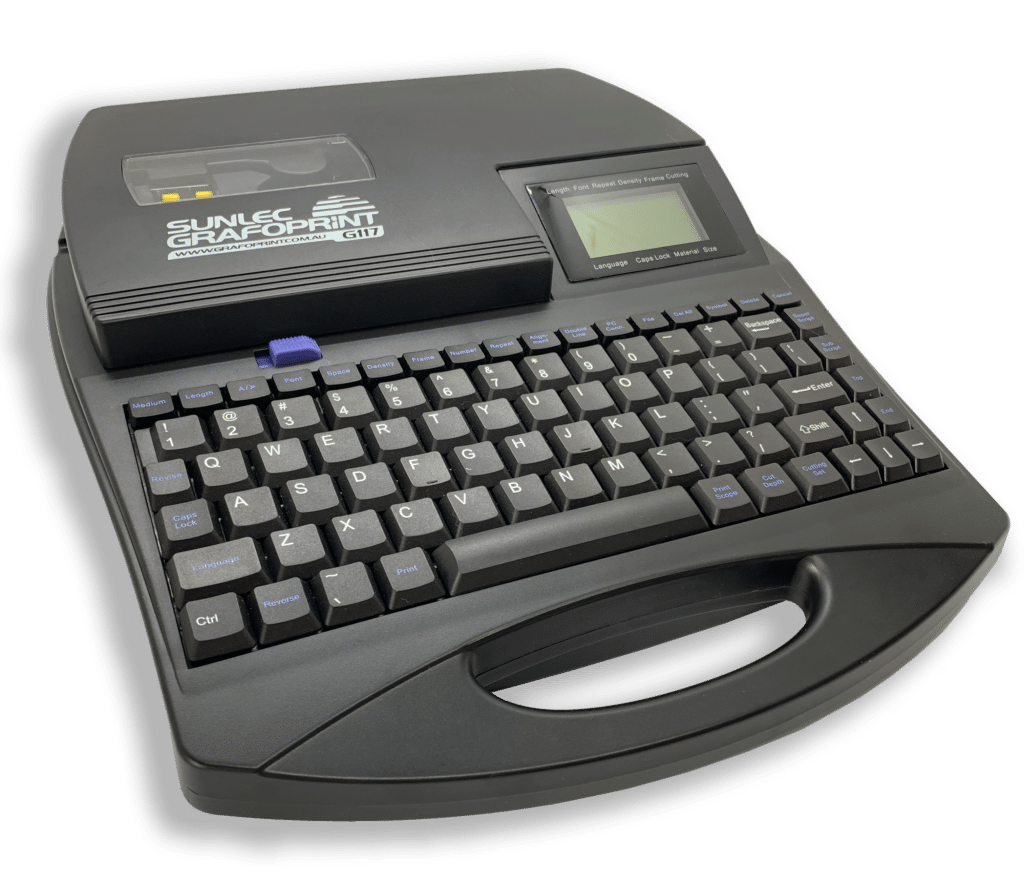
Mobile Marking Systems: These are compact devices designed to be transported to, and used on, the job site. A great example is the Sunlec GRAFOPRINT for Grafoplast, which is built for mobile wire marking. Mobile systems allow technicians to create and print labels as needed, right at the panel or point of installation.
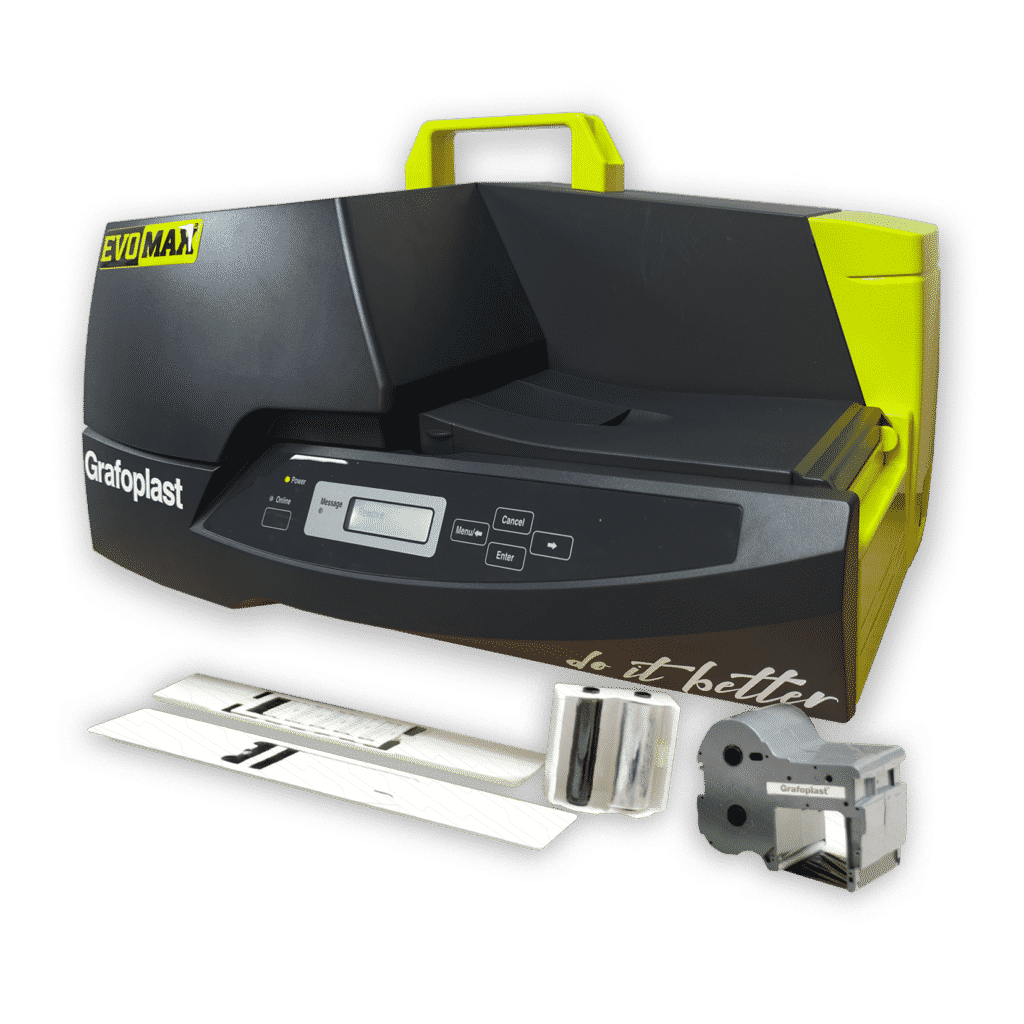
Stationary Marking Systems: These are larger, more robust printers designed for high-volume output in a controlled environment like a workshop or production facility. The Grafoplast EVOMAX Thermal Printer is a prime example of a stationary system. Stationary printers are typically connected to a computer and are used to pre-print large batches of labels before a project begins.
With these definitions in mind, let’s dive into a head-to-head comparison.
Efficiency and Speed
Efficiency is about maximising output while minimising effort. In the context of wire marking, this translates to how quickly you can get from a wire list to a fully labeled panel.
Mobile Systems
Pros:
Mobile printers excel at on-the-fly adjustments. If a last-minute change is made to a circuit or a technician discovers a wire that was missed in the initial plans, they can print a new label instantly without leaving the job site. This immediate problem-solving capability prevents small issues from causing significant delays.
Cons:
The speed of a mobile printer is limited to real-time, on-demand production. Creating hundreds of labels one by one on a handheld device can be slow and tedious, turning a large marking job into a significant bottleneck.
Stationary Systems
Pros:
This is where stationary systems shine. A high-volume thermal printer like the EVOMAX can produce thousands of labels in a fraction of the time it would take to create them manually or with a mobile device. By importing a wire list from a spreadsheet, you can automate the printing of entire projects. This batch production model is exceptionally efficient for large-scale or repetitive jobs.
Cons:
The efficiency of a stationary system relies on good planning. If your wire list is inaccurate or incomplete, you will end up with wasted labels. Any on-site changes will require a new print run back at the shop, which can cause delays if not managed properly.
Winner for Efficiency: Stationary Systems, for their unparalleled batch processing speed in high-volume scenarios.
Flexibility and Adaptability
Flexibility is the ability to adapt to the varied and often unpredictable conditions of electrical work.
Mobile Systems
Pros:
The key advantage of a mobile system is its adaptability. It can be carried anywhere, from a cramped service vehicle to the top of a ladder or deep within a large piece of machinery. This makes it ideal for service calls, small-scale installations, and retrofit projects where you may not know the exact labeling requirements until you are on site.
Cons:
While the device itself is flexible, it may have limitations in the types and sizes of markers it can produce compared to a more robust stationary unit.
Stationary Systems
Pros:
Stationary systems, powered by desktop software, often offer a wider range of customisation options. You can easily manage complex layouts, import custom logos or symbols, and work with a broader array of tag sizes and materials. This makes them highly versatile for creating specialised labels for unique components.
Cons:
The lack of portability is the obvious drawback. A stationary printer is tied to a power source and a computer in a fixed location. It is completely impractical for on-site work, field repairs, or any task that requires creating labels away from the workshop.
Winner for Flexibility: Mobile Systems, for their ability to function in any environment and adapt to unforeseen needs on the job.
Cost Considerations
Cost is more than just the initial purchase price of the printer. It includes consumables, labour, and potential downtime.
Mobile Systems
Pros:
The initial investment for a mobile printer is typically lower than for a high-output stationary system. For smaller contractors or independent electricians, this makes it a more accessible entry point into professional-grade labeling.
Cons:
The cost of consumables, such as label cartridges and ribbons, can be higher on a per-label basis compared to the bulk materials used by stationary printers. Furthermore, the “hidden cost” of a technician’s time spent printing labels on-site can add up significantly on larger jobs.
Stationary Systems
Pros:
While the upfront cost of the printer is higher, the per-label cost is generally much lower due to the use of bulk rolls of material and ribbons. The massive savings in on-site labor – by shifting label creation to a more efficient, pre-production process – delivers a significant return on investment, especially for businesses that handle high volumes of work.
Cons:
The higher initial purchase price can be a barrier to entry for smaller companies. The system also requires a dedicated space in a workshop, adding to overhead costs.
Winner for Cost: It’s a tie. The best choice depends on your business model. Mobile is cheaper upfront, while stationary offers a lower long-term cost per label and significant labor savings at scale.
Scenarios: Which System Excels Where?
To put it all together, let’s look at some common scenarios.
Scenario 1: The Service Electrician
An electrician is on a service call to troubleshoot a fault in an existing control panel. They find a few burnt-out wires that were never labeled.
- Best Choice: Mobile Marking System.
- Why: The technician can quickly identify the wires, print new, professional labels on the spot, and complete the repair in a single visit. Bringing a stationary printer is impossible, and hand-writing labels is unprofessional and unreliable.
Scenario 2: The Switchboard Manufacturer
A company builds dozens of identical control panels for a specific type of industrial machinery every month.
- Best Choice: Stationary Marking System.
- Why: The wire list is the same for every panel. The company can set up a template and print hundreds of complete, organised tags in an automated batch. This dramatically speeds up their production line, reduces errors, and lowers labor costs per unit.
Scenario 3: The Large-Scale Construction Project
An electrical contractor is wiring a new commercial building, which involves thousands of individual circuits running from multiple distribution panels.
- Best Choice: A Hybrid Approach (Stationary, In-House Service and mobile).
- Why: For the bulk of the work, using a stationary system or an in-house marking service to pre-print all the known wire labels based on the electrical plans is the most efficient method. This saves hundreds of hours of on-site labor. A few mobile printers should also be available on-site for the inevitable last-minute changes, additions, or corrections that occur during a large project.
Conclusion: Choosing the Right Tool for the Job
The debate between mobile and stationary marking systems isn’t about which one is universally “better,” but which one is the right tool for your specific job.
- Choose a mobile system if your work primarily involves service calls, small-scale installations, maintenance, and repairs. Its flexibility and on-demand printing capabilities are perfect for unpredictable, low-volume scenarios.
- Choose a stationary system if your business is focused on high-volume production, new construction, or manufacturing identical panels. Its speed, efficiency, and low cost-per-label at scale will provide a significant competitive advantage.
Many growing businesses find that a hybrid approach offers the best of both worlds: a stationary printer in the shop for the heavy lifting and a mobile unit in each service vehicle for field operations. By evaluating your workflow, project types, and business goals, you can invest in the marking system that will best support your team, improve your efficiency, and enhance the quality of your work.
 Accessories & Tools
 Adhesive, Channel & Clip-in Markers
 Cable Tie Sleeves
 Kits
Kits Slide-On Sleeves
 Snap-On Sleeves 300 Series
 Spark Crimp-On Pins & Terminals
 Terminal, Relay and Contactor Markers